

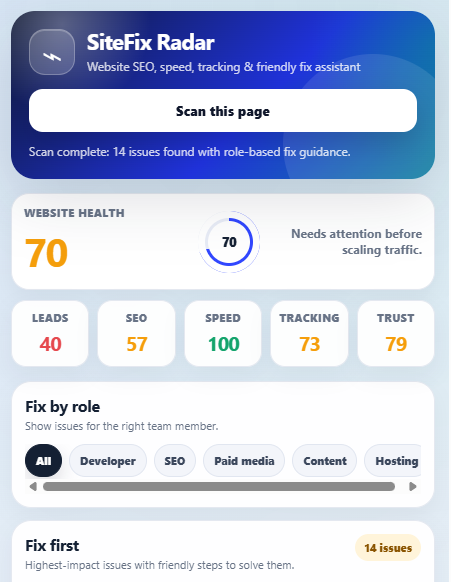
SiteFix Radar is a free website audit browser extension built to help website owners, SEO teams, developers, marketers, and agencies quickly find common website issues in one click.
Most website audit tools only show technical errors. SiteFix Radar goes one step further. It not only highlights problems, but also explains why the issue matters, who should fix it, and how to solve it in a simple and friendly way.
Whether you manage a WordPress website, business website, service landing page, blog, ecommerce page, or client website, this free extension helps you check important website problems before they affect leads, rankings, tracking, or user trust.
Download SiteFix Radar Free Browser Extension
What Is SiteFix Radar?
SiteFix Radar is a free website audit browser extension that scans the current webpage and gives a practical fix plan for common website issues.
It helps you check:
- SEO basics
- Website speed warnings
- Lead-loss problems
- Contact form issues
- Tracking and analytics setup
- Trust and security signals
- Image and content problems
- Developer and SEO fix guidance
The extension is designed for real users, not only technical experts. A business owner can understand the report, while a developer or SEO member can use the fix guidance to solve the issue faster.
Why Website Owners Need This Free Website Audit Browser Extension
Many websites look good from the outside but still lose leads because of small hidden problems.
For example:
- The phone number is not clickable on mobile
- The contact form submit button is missing or not clear
- The page has no meta description
- Important images have no alt text
- Google Analytics or conversion tracking is missing
- The website has slow images
- A CTA button is present but not linked properly
- The website does not show enough trust signals
- The landing page is not ready for paid ads
These issues can reduce enquiries, hurt SEO performance, waste ad budget, and create a poor user experience.
SiteFix Radar helps you find these problems quickly so your team can fix them before users leave the website.
Key Features of SiteFix Radar
1. SEO Issue Checker
SiteFix Radar checks important on-page SEO elements, including:
- SEO title
- Meta description
- H1 heading
- Canonical tag
- Noindex status
- Image alt text
- Open Graph tags
- Internal links
- Page structure
This helps SEO members quickly understand whether the page has basic optimisation issues.
2. Lead-Loss Checker
A website is not only made for traffic. It should also help users take action.
SiteFix Radar checks important lead elements such as:
- Clickable phone numbers
- Clickable email links
- Contact forms
- Submit buttons
- CTA buttons
- WhatsApp links
- Booking links
- Broken or empty buttons
This is very useful for service businesses, clinics, agencies, local businesses, ecommerce stores, and lead generation websites.
3. Speed & Performance Warnings
SiteFix Radar gives quick performance warnings that can help developers improve page experience.
It can detect common issues like:
- Large images
- Missing lazy loading
- Too many third-party scripts
- Too many CSS files
- Heavy embedded elements
- Iframes that may slow the page
This does not replace a full speed test, but it gives a fast first-level check directly from the browser.
4. Tracking & Marketing Setup Checker
For paid media teams and marketers, tracking is very important.
SiteFix Radar helps check whether common marketing tags are present, such as:
- Google Tag Manager
- Google Analytics
- Google Ads tracking
- Meta Pixel
- LinkedIn Insight Tag
- Microsoft Ads UET
- Microsoft Clarity
- Hotjar
This helps marketing teams quickly check whether a landing page is ready before running ads.
5. Trust & Security Signal Checker
Users are more likely to take action when a website looks trustworthy.
SiteFix Radar checks basic trust signals such as:
- HTTPS
- Mixed content warnings
- Favicon
- Privacy policy link
- Contact information signals
- Suspicious spam terms
This is useful for website owners who want to improve trust and reduce user hesitation.
Friendly Fix Guidance for Developers, SEO Members & Marketers
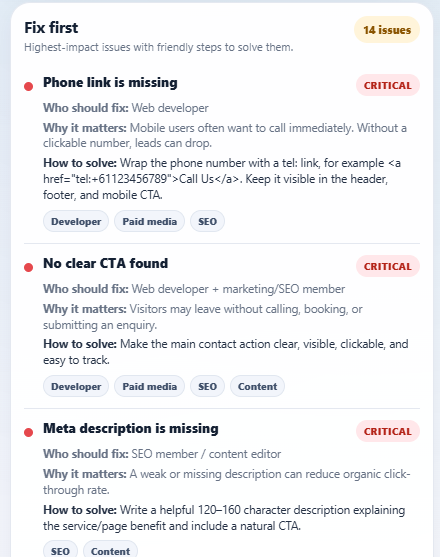
SiteFix Radar does not only show a list of errors.
Each issue includes practical fix guidance, such as:
- What the issue is
- Why it matters
- Who should fix it
- How to solve it
- Whether it is critical, warning, suggestion, or passed
This makes it easier for different team members to take action.
For example:
- A developer can fix form, CTA, speed, and technical issues
- An SEO member can fix title, meta description, headings, and image alt text
- A paid media specialist can check conversion tracking and landing page readiness
- A content editor can improve page content, headings, and readability
- A hosting team can review HTTPS or server-related concerns
This saves time because the report is not only technical; it is action-focused.
Who Can Use SiteFix Radar?
SiteFix Radar is useful for:
- Website owners
- WordPress users
- SEO freelancers
- Digital marketing agencies
- Paid media teams
- Web developers
- Content writers
- Ecommerce store owners
- Local business owners
- Clinic and service business teams
- Bloggers and affiliate website owners
If you manage a website and want to know what may be stopping users from taking action, SiteFix Radar can help.
Best Use Cases
You can use SiteFix Radar when:
- Launching a new website
- Checking a landing page before Google Ads or Meta Ads
- Reviewing a client website
- Auditing a WordPress page
- Finding SEO basics quickly
- Checking if tracking tags are present
- Finding broken CTA or contact issues
- Preparing a developer fix list
- Reviewing website trust signals
- Improving website conversion performance
Why SiteFix Radar Is Different
Many tools give technical reports that are difficult for normal users to understand.
SiteFix Radar is different because it focuses on three things:
- Find the issue quickly
- Explain the issue clearly
- Guide the right person to fix it
This makes the extension helpful for both beginners and professionals.
A website owner can understand the problem, and a developer or SEO member can use the fix guide to solve it.
Privacy-Friendly Website Scan
SiteFix Radar is designed with user trust in mind.
The extension scans the current active webpage only when the user clicks the scan button. It does not require login and is built to work as a simple browser-side website checking tool.
For support, plugin information, and updates, visit our website:
How to Use SiteFix Radar
Using SiteFix Radar is simple:
- Install the extension in your browser
- Open the website page you want to check
- Click the SiteFix Radar extension icon
- Click the scan button
- Review the SEO, speed, tracking, trust, and lead issue report
- Share the fix guide with your developer, SEO member, or marketing team
The extension is made to save time and make website checking easier for everyone.
Download SiteFix Radar Free
SiteFix Radar is a free website audit browser extension for users who want a simple way to check website problems and fix them faster.
Use it to check SEO basics, lead-loss issues, speed warnings, tracking setup, trust signals, and developer-friendly fix guidance.
Frequently Asked Questions
What is SiteFix Radar?
SiteFix Radar is a free website audit browser extension that checks SEO, speed, tracking, lead-loss, and trust issues on the current webpage.
Is SiteFix Radar free?
Yes, SiteFix Radar is available as a free extension.
Who should use this extension?
Website owners, developers, SEO members, paid media teams, agencies, WordPress users, and marketers can use it to find and fix common website issues.
Does SiteFix Radar only show errors?
No. SiteFix Radar also gives friendly fix guidance. It explains why the issue matters, who should fix it, and how to solve it.
Can this extension help SEO teams?
Yes. It checks important SEO basics such as title tags, meta descriptions, H1 headings, image alt text, canonical tags, noindex status, and page structure.
Can this extension help paid media teams?
Yes. Paid media teams can use it to check landing page readiness, CTA issues, form issues, and tracking tags before running ads.
Can developers use the fix guide?
Yes. Developers can use the report to solve technical issues related to forms, CTA buttons, page speed warnings, scripts, HTTPS, and other website problems.
Does SiteFix Radar replace full SEO tools?
No. It is a fast browser-side issue checker. It is best used for quick audits, landing page checks, and practical fix guidance.
Where can I get support?
You can visit FreegameShot for support, plugin information, and future updates: https://www.freegameshot.com/