

WordPress powers millions of websites across the world. It is easy to use, flexible, and perfect for businesses, blogs, ecommerce stores, service websites, and personal brands. But because WordPress is so popular, it is also one of the most common targets for hackers, malware injections, spam links, fake redirects, and suspicious file attacks. Hence download advanced WordPress security plugin.
Many website owners only realise their website has been hacked after something goes wrong.
Sometimes- Google shows a warning.
Sometimes- the website redirects to spam websites.
Sometime: unwanted casino, pharma, adult, Japanese, or Chinese spam pages start appearing in search results.
Sometimes: the website goes down without any clear reason.
Sometimes: unknown files are added to the server without the owner knowing.
To help website owners check these problems more easily, we created a free advanced WordPress security plugin that can scan your website, highlight suspicious issues, monitor downtime, and guide you with clear next steps.
Why WordPress Website Security Matters
A hacked WordPress website can damage your business, search visibility, customer trust, and website performance.
Common issues caused by website hacks include:
- Website showing a critical error
- Website redirecting to unknown or spam websites
- Google indexing spam pages
- Suspicious PHP files inside upload folders
- Hidden SEO spam links inside pages or posts
- Unknown admin users created in WordPress
- Malware code added to theme or plugin files
- Sitemap or robots.txt manipulation
- Website downtime
- Search ranking drops
- Google Ads disapproval due to unsafe destination
- Client trust and brand reputation issues
That is why regular security scanning is important. Even if your website looks normal from the front end, there may still be hidden files, injected database content, or SEO spam links affecting the backend.
Introducing ShieldRoot Security Pro — Free WordPress Security Scanner
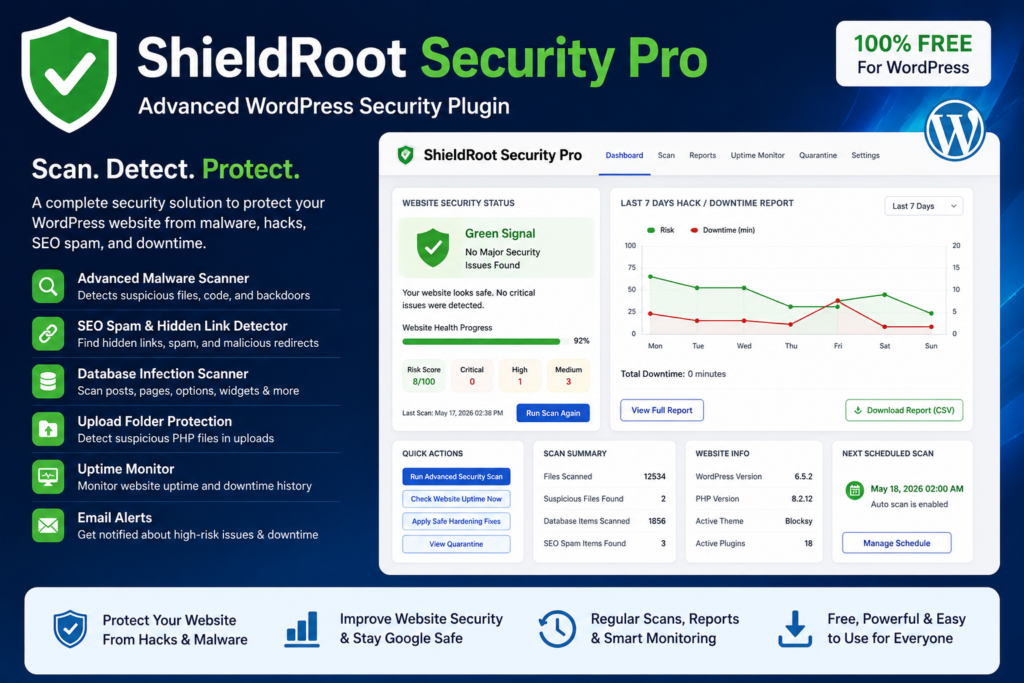
ShieldRoot Security Pro is a free WordPress security plugin designed to help website owners, developers, SEO teams, and digital marketers detect common WordPress security risks quickly.
The plugin is built to make website security easier to understand. Instead of showing confusing technical messages, it displays clear reports with the exact issue, location, risk level, evidence, and suggested action.
It helps you understand:
- Is the website safe?
- Are there any suspicious files?
- Is there any SEO spam?
- Is the website down or unstable?
- Which file, folder, post, or database option needs review?
- What action should be taken next?
Key Features of the Advanced WordPress Security Plugin
1. Malware & Suspicious Code Scanner
The plugin scans your WordPress files for suspicious code patterns that are commonly found in hacked websites.
It can help detect signs of:
- Malware code
- Backdoor files
- Suspicious PHP functions
- Hidden scripts
- Unknown executable files
- Suspicious files inside upload folders
The plugin does not create panic by marking every advanced code pattern as a confirmed hack. Instead, it shows risk levels and review instructions so users can take safe action.
2. SEO Spam & Hidden Link Detection
SEO spam is one of the most common WordPress hacking issues. Hackers may inject hidden links into your website content, database, theme files, or sitemap.
ShieldRoot Security Pro checks for suspicious signs such as:
- Porn links
- Casino spam
- Pharma spam
- Japanese keyword spam
- Chinese keyword spam
- Hidden external links
- Suspicious injected URLs
- Doorway-style SEO spam
The report shows the location and evidence so the user can easily review the affected post, page, or file.
3. Database Infection Scanner
Many hacks are not visible in website files. Sometimes the infection is stored inside the WordPress database.
The plugin scans key database areas including:
- Posts
- Pages
- Options
- Widgets
- Stored scripts
- Suspicious URLs
- Hidden injected content
This helps identify issues that may not appear in normal file scans.
4. Upload Folder Protection
A common WordPress hack is when attackers place PHP files inside the /wp-content/uploads/ folder.
Normally, the uploads folder should contain images, PDFs, documents, and media files. It should not contain executable PHP files.
ShieldRoot Security Pro checks the upload folder and highlights suspicious executable files so the user can take action.
5. Website Uptime Monitoring
Security is not only about malware. A website going down can also affect business, SEO, lead generation, and customer trust.
The plugin includes uptime monitoring so you can check whether your website is live or facing downtime.
It can show:
- Website live status
- Latest uptime check
- HTTP response status
- Downtime history
- Total recorded downtime
This is useful for website owners, agencies, and maintenance teams.
6. Email Notification for High-Risk Issues
If the plugin detects high-risk issues or downtime, it can send an email alert to the configured email address.
This helps website owners take action quickly instead of discovering the problem too late.
7. Progressive Website Health Status
The plugin includes a clear website health status section.
Instead of always showing a scary warning, the dashboard changes based on the actual scan result.
It can show:
- Urgent Fix Required
- Security Review Required
- Website Mostly Safe
- Green Signal
- No Major Security Issue Found
As issues are fixed and the scan is run again, the progress updates automatically. This helps users clearly understand whether the website is improving.
8. Last 7 Days / 1 Month / 3 Months / 1 Year Report
The plugin includes a hack and downtime report with multiple date range options:
- Last 7 days
- 1 month
- 3 months
- 1 year
This makes it easier to track website security history over time.
9. Downloadable Security Report
Users can download a report sheet for record keeping, client reporting, or internal review.
The report can include:
- Website URL
- Report period
- Risk score
- Scan history
- Downtime history
- Detected issues
- Issue location
- Evidence
- Suggested fix
This is especially useful for freelancers, agencies, developers, and website maintenance teams.
Who Can Use This Plugin?
ShieldRoot Security Pro is useful for:
- WordPress website owners
- Bloggers
- Business websites
- Ecommerce stores
- SEO agencies
- Digital marketing agencies
- Freelance web developers
- WordPress maintenance teams
- Website security support teams
- Small businesses that cannot afford expensive security tools
The plugin is created to make WordPress security easier, clearer, and more accessible for everyone.
Why We Are Offering This Plugin for Free
Many small businesses and website owners do not realise their website is hacked until it affects their traffic, leads, search ranking, or customer trust.
We wanted to create a free tool that helps people check their website security before the damage becomes serious.
The goal is simple:
Help more WordPress users detect security risks early and keep their websites safer.
A clean and secure website is better for users, better for SEO, and better for business.
Advanced WordPress Security Plugin Can Help Detect
ShieldRoot Security Pro can help detect or review many common WordPress problems, including:
- Suspicious PHP files
- Malware-like code patterns
- SEO spam links
- Hidden external links
- Porn/casino/pharma spam
- Japanese or Chinese spam patterns
- Unknown admin users
- File permission risks
- Outdated PHP environment information
- Sitemap and robots.txt issues
- Database injected content
- Upload folder infection
- Website downtime
- High-risk WordPress file changes
Important Note About advanced WordPress security plugin
No plugin can guarantee 100% protection from every hack.
Website security also depends on:
- Hosting quality
- Server configuration
- WordPress updates
- Plugin and theme updates
- Strong passwords
- Admin user control
- File permissions
- Backup system
- Firewall protection
- Regular monitoring
ShieldRoot Security Pro is designed to help you scan, monitor, detect, and respond to common security issues. For highly infected websites, it is always recommended to take a full backup and get expert review before deleting important files.
Best Practices to Keep Your WordPress Website Safe
Along with using a security scanner, follow these important steps:
- Keep WordPress core updated.
- Keep all plugins and themes updated.
- Delete unused plugins and themes.
- Use strong admin passwords.
- Avoid using usernames like
admin,demo, ortest. - Install plugins only from trusted sources.
- Take regular website backups.
- Disable file editing from WordPress admin.
- Check for unknown admin users.
- Monitor Google Search Console for indexing or security warnings.
- Scan the uploads folder for suspicious PHP files.
- Review sitemap and robots.txt regularly.
- Use reliable hosting with security support.
- Monitor website downtime.
- Act quickly when suspicious activity is detected.
Download the advanced WordPress security plugin
You can download and use ShieldRoot Security Pro for free.
This plugin is built to help WordPress users scan their website, monitor security risks, detect suspicious files, review SEO spam, track downtime, and keep their website healthier.
Advanced WordPress security plugin
WordPress security should not be complicated or scary. Website owners need simple, clear, and useful tools that show what is wrong, where the issue is located, and what action should be taken.
ShieldRoot Security Pro is created with that purpose.
It helps you stay aware, scan your website, review suspicious issues, monitor downtime, and take safer action before small problems become serious.
If you are using WordPress, regular scanning is not optional anymore. It is an important part of website maintenance, SEO protection, and business safety.
Install the free plugin, run your first scan, and keep your website safer from common WordPress security risks.
FAQs for advanced WordPress security plugin
1. What is ShieldRoot Security Pro?
ShieldRoot Security Pro is a free WordPress security plugin that helps scan your website for malware, suspicious files, SEO spam, database infections, upload folder risks, and downtime issues.
2. Is ShieldRoot Security Pro free to use?
Yes, ShieldRoot Security Pro is free to use. It is created to help WordPress website owners scan, monitor, and improve their website security without paying for expensive tools.
3. Can this plugin detect if my WordPress website is hacked?
Yes, the plugin can help detect common signs of a hacked WordPress website, such as suspicious PHP files, spam URLs, hidden SEO links, unknown admin users, database injections, and risky file changes.
4. Does the plugin remove malware automatically?
The plugin provides safe fix and quarantine options for selected issues. However, it does not blindly delete important theme, plugin, or core WordPress files because that can break the website. It highlights the exact issue and suggests the safest next step.
5. Can ShieldRoot Security Pro detect SEO spam?
Yes, the plugin can help detect SEO spam patterns such as hidden links, porn links, casino spam, pharma spam, Japanese keyword spam, Chinese keyword spam, and suspicious URLs inside posts, pages, options, and files.
6. Does the plugin scan the WordPress database?
Yes, ShieldRoot Security Pro can scan important WordPress database areas such as posts, pages, options, widgets, and stored content to identify suspicious URLs, scripts, or spam injections.
7. Can the plugin monitor website downtime?
Yes, the plugin includes an uptime monitoring feature that checks whether the website is live or down. It also records downtime history and helps website owners review website stability over time.
8. Will I receive email alerts if my website has an issue?
Yes, you can set an alert email address in the plugin settings. The plugin can send notifications when high-risk issues or downtime are detected.
9. Can beginners use this WordPress security plugin?
Yes, the plugin is designed with a simple dashboard, clear risk status, exact issue location, detected evidence, and suggested fixes so beginners, business owners, developers, and SEO teams can use it easily.
10. Does this plugin guarantee 100% website protection?
No plugin can guarantee 100% protection from every possible hack. ShieldRoot Security Pro helps detect, monitor, and guide users to fix common WordPress security risks, but website security also depends on hosting, updates, backups, strong passwords, and server configuration.