

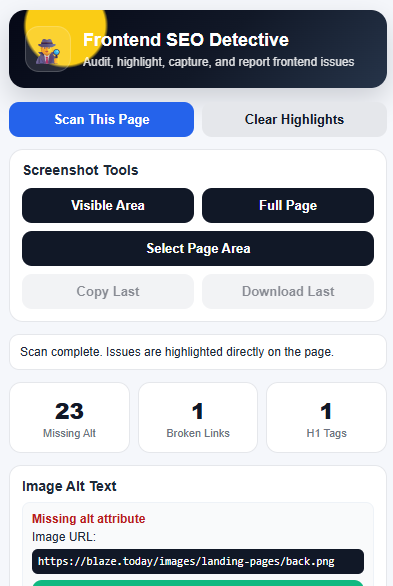
If you work on websites, SEO, content, design, or development, small frontend issues can easily go unnoticed. A missing image alt text, a broken link, or more than one H1 tag may look like a minor problem, but these issues can affect user experience, website quality, accessibility, and search engine optimisation. That is why we created a free SEO browser extension for website owners, SEO professionals, developers, designers, bloggers, and digital marketers who want to quickly check important on-page SEO elements directly from the frontend of any website page.
This free extension helps you inspect a live webpage without opening complicated tools or technical reports. You can check missing image alt text, broken links, multiple H1 tags, and even take full-page screenshots or selected-area screenshots for reporting and website improvement tasks.
Whether you are auditing your own website, checking a client website, reviewing a landing page, or preparing an SEO improvement report, this browser extension can save time and make your work easier.
What Is This Free SEO Browser Extension?
This free SEO browser extension is a simple and useful frontend checking tool created to help users identify common website issues directly on a webpage.
Instead of guessing where the problem is, the extension highlights the issue on the actual page. This makes it easier for developers, SEO teams, content writers, and website owners to understand what needs to be fixed.
For example, if an image is missing alt text, the extension can detect it and show the issue in the report. If there is more than one H1 tag on the page, it can identify the headings and show where they are placed. If there are broken links, the extension helps you find them from the frontend so you can fix or update those links faster.
It is made for real users who want a quick, clean, and practical website checking tool without unnecessary complexity.
Why Missing Image Alt Text Matters for SEO
Image alt text is important because it helps search engines and screen readers understand what an image is about. When an image does not have alt text, it can reduce the quality of your page from both an SEO and accessibility point of view.
Many websites use banners, product images, service images, icons, and blog graphics. If these images are missing proper alt text, search engines may not fully understand their purpose. This can also create problems for users who rely on assistive technology.
With this free SEO browser extension, you can quickly check whether images on a page have proper alt attributes. The tool can report images with missing alt text or missing alt attributes, helping you improve your website’s on-page SEO and accessibility.
This is especially useful for:
- SEO audits
- Blog optimisation
- Product page checks
- Landing page reviews
- Website accessibility improvements
- Client reporting
Find Broken Links Directly from the Frontend
Broken links can create a poor user experience. When a visitor clicks a link and lands on a 404 error page or a page that does not load, it can reduce trust in the website.
Broken links can also affect SEO quality. Search engines prefer websites that provide clean navigation and useful page connections. If important internal or external links are broken, users and search engines may struggle to move through your website properly.
This free SEO browser extension helps users check links from the frontend and identify links that may be broken or not working correctly. It also helps show where the link is located on the page, making it easier for a developer or website manager to fix it.
This feature is helpful when checking:
- Header links
- Footer links
- Button links
- Blog links
- Menu links
- CTA links
- Service page links
- Product page links
Instead of manually clicking every link on a page, you can use the extension to speed up the checking process.
Check Multiple H1 Tags on Any Website Page
A webpage should usually have one clear main H1 heading. The H1 tells users and search engines what the main topic of the page is. When a page has multiple H1 tags, it can create confusion about the main focus of the content.
Some websites accidentally create multiple H1 tags because of page builder settings, theme templates, banners, hidden headings, or copied sections. This is common in WordPress, Elementor, Shopify, WooCommerce, and custom websites.
The free SEO browser extension checks the page and reports if multiple H1 tags are present. It also helps users locate where the H1 tags appear on the page.
This is useful for:
- SEO experts checking page structure
- Developers fixing heading hierarchy
- Content writers reviewing page formatting
- Website owners improving on-page SEO
- Agencies preparing technical SEO reports
A clean heading structure can make your website easier to understand for both visitors and search engines.
Take Full Page Screenshots and Selected Area Screenshots
Another useful feature of this extension is screenshot capture.
When working on SEO or website development tasks, screenshots are often needed for reporting, task management, client communication, or internal team updates. Instead of using multiple tools, this extension allows users to capture screenshots directly from the browser.
The extension includes options such as:
- Capture visible screen area
- Capture full page screenshot
- Select a specific page area
- Copy screenshot
- Download screenshot
This is very helpful when you want to show a developer exactly where an issue is located. For example, if a broken link appears in the footer or an image without alt text appears in a service section, you can capture that area and share it with your team.
This makes communication faster and reduces confusion.
Who Can Use This Free SEO Browser Extension?
This free SEO browser extension is created for anyone who works with websites.
It can be useful for:
SEO Professionals
SEO experts can use it to quickly check basic frontend SEO issues before preparing a report or making optimisation recommendations.
Website Developers
Developers can use it to locate frontend issues like broken links, incorrect heading structure, or missing image alt attributes.
WordPress and Elementor Users
Many WordPress websites are built using Elementor or similar page builders. This extension can help users check pages after design updates, content changes, or plugin changes.
Digital Marketing Agencies
Agencies can use the extension for quick website audits, client reviews, landing page checks, and task documentation.
Bloggers and Content Writers
Bloggers can use the extension to make sure blog images have alt text and that the page structure is SEO-friendly.
Business Owners
Business owners who manage their own websites can use this simple tool to identify common website issues without needing advanced technical knowledge.
Why We Are Offering This Extension for Free
At FreeGameShot, we believe useful tools should be easy to access. Many small business owners, bloggers, freelancers, and website beginners cannot always pay for expensive SEO tools.
This free SEO browser extension is our way of helping users improve their websites with a simple and practical tool. It does not replace a complete technical SEO audit, but it gives users a quick way to identify common frontend issues that are often missed.
Our goal is to help more website owners keep their websites clean, user-friendly, and search-friendly.
How This Extension Helps Improve Website SEO
Good SEO is not only about keywords. A strong website also needs clean structure, working links, accessible images, and a better user experience.
This extension helps by checking important frontend elements such as:
- Missing image alt text
- Images without alt attributes
- Broken links
- Multiple H1 tags
- Page areas that need screenshot documentation
By fixing these issues, website owners can improve the overall quality of their pages. This can support better user experience, clearer page structure, improved accessibility, and stronger SEO foundations.
Download the Free SEO Browser Extension
You can download the free SEO browser extension from FreeGameShot and start checking your website pages quickly.
Use it for your website, client website, blog, landing page, product page, or service page. It is simple, practical, and built for real website work.
Download the free SEO browser extension today and start finding missing alt text, broken links, multiple H1 tags, and screenshot areas directly from your browser.
Final Thoughts
Website optimisation becomes easier when you can clearly see what needs to be fixed. This free SEO browser extension is designed to make frontend SEO checking simple for developers, SEO professionals, agencies, bloggers, and website owners.
From missing image alt text to broken links, from multiple H1 tags to full-page screenshots, this tool gives you helpful features in one place.
If you regularly work on websites, this free browser extension can become a useful part of your daily SEO and website checking process.
FAQ Section
1. What is the Free SEO Browser Extension?
The Free SEO Browser Extension is a browser tool that helps users check missing image alt text, broken links, multiple H1 tags, and capture screenshots directly from a website page.
2. Is this SEO browser extension free?
Yes, this extension is free to download from FreeGameShot.
3. Who can use this extension?
SEO professionals, developers, website owners, bloggers, digital marketers, designers, and agencies can use this extension.
4. Can this extension find missing image alt text?
Yes, it can identify images with missing alt text or missing alt attributes on a webpage.
5. Can it check broken links?
Yes, the extension can help find broken links from the frontend and show where the link is located on the page.
6. Does it detect multiple H1 tags?
Yes, it checks whether a page has multiple H1 tags and helps users find their location.
7. Can I take full-page screenshots?
Yes, the extension includes full-page screenshot capture, visible area capture, selected area screenshot, copy, and download options.
8. Is it useful for WordPress websites?
Yes, it is useful for WordPress, Elementor, WooCommerce, Shopify, custom websites, and many other types of websites.
9. Does this extension replace a full SEO audit?
No, it does not replace a full SEO audit, but it helps identify common frontend SEO issues quickly.
10. Where can I download the extension?
You can download the free SEO browser extension from FreeGameShot.